 English

$250.00


VIN security-link a Holden VE Series 1 factory radio to your vehicle — the programming required after replacing your head unit with a second-hand radio, or swapping one between cars.
DIY at home using the included OBDSync scantool and a 2-token redemption serial that you redeem onto your own OBDSync account. Plug into your VE’s OBD-II port, follow the on-screen steps, and the radio is linked to your VIN and fully functional in minutes.
Supports both Series 1 radio types — the standard radio without a screen (Omega / Berlina / SV6 / SS / Ute) and the upper-trim radio with a screen (Calais / Calais V / SS-V / HSV E1 / E2) — using the same kit.
Bring a swapped or second-hand VE Series 1 factory radio back to life. This DIY kit binds the radio to your VIN to clear the security lockout — all from a Windows laptop using our OBDSync software.
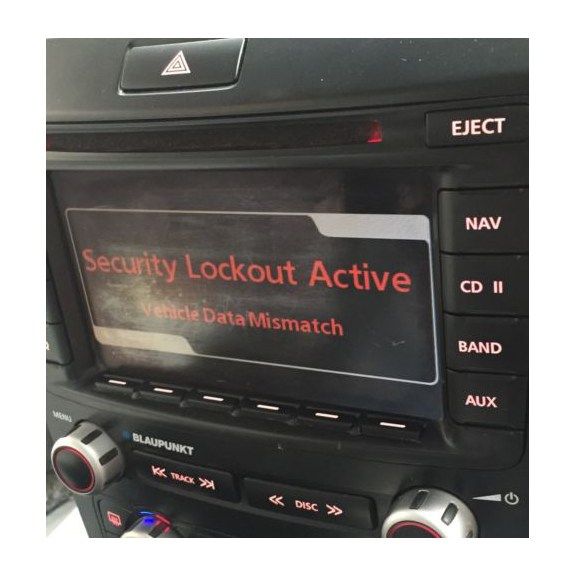
The factory radio fitted to all Holden VE Series 1 Commodores and HSV E-Series vehicles is VIN-locked from the factory. If you replace or swap your radio with a second-hand unit, it will display a security lockout screen and refuse to function until it’s re-linked to your vehicle’s VIN.
This kit lets you perform that security-linking yourself at home using OBDSync, our Windows laptop software. Plug the included scantool into your OBD-II port, run the security link function, and the radio is married to your VIN within minutes — no workshop visit, no waiting on couriers, no shipping your radio anywhere.
If you’re seeing the lockout screen pictured above, this is exactly the kit you need.
This kit works with both factory radio variants fitted to the VE Series 1 range — the standard radio and the upper-trim radio — using the same OBDSync workflow:
The base factory head unit with LCD text display only — no full colour screen.
The premium factory head unit with the full colour information display.
Two full walkthrough videos — one for each radio type. Pick the one that matches your car:
OBDSync VIN security link walkthrough for Calais / Calais V / SS-V / HSV / Statesman / Caprice:
OBDSync VIN security link walkthrough for Omega / Berlina / SV6 / SS / base Ute / Sportwagon:
Provide your VIN at checkout. We ship the OBDSync scantool together with a printed 2-token redemption serial.
Download & install OBDSync (Windows 10 / 11, 64-bit). Create or sign in to your OBDSync account, then enter your redemption serial to add the 2 tokens to your own account.
Plug the scantool into your VE’s OBD-II port, run the radio VIN security link function in OBDSync, and the radio is unlocked & bound to your VIN in minutes.
Works on all Holden VE Series 1 Commodore and HSV E1 / E2 vehicles with the factory radio (2006–2010):
OBDSync runs on Windows 10 or Windows 11 (64-bit only). A laptop is recommended so you can sit in the car with the scantool plugged into the OBD-II port. A free USB-A port is required.
When you add this product to your cart you’ll be asked for your VIN so we can verify the kit is suitable for your vehicle. Your scantool and printed token redemption serial are dispatched once your order is processed — you then redeem that serial yourself inside OBDSync to apply the tokens to your account.
DIY kit only — no workshop visit, no shipping the radio anywhere. Program from your driveway in minutes.
| Weight | 0.2 kg |
|---|---|
| Dimensions | 15 × 10 × 5 cm |
| car-model | Clubsport, Grange, GTS, Maloo, Senator, Commodore, Ute, Calais, Caprice, Statesman |
| car-year | 2010, 2009, 2008, 2007, 2006 |