 English

$250.00


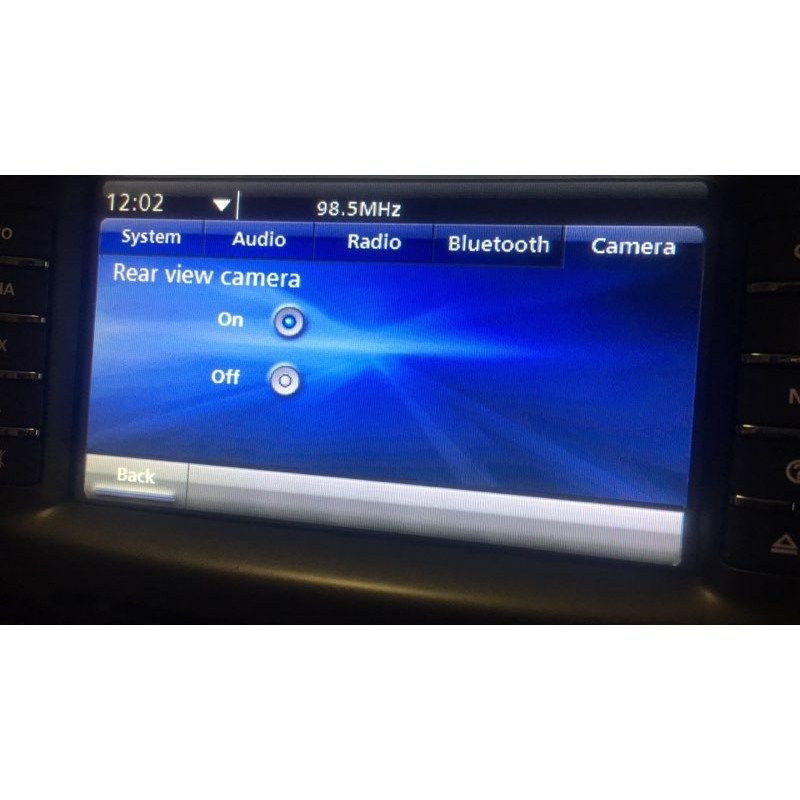
Enable the factory reverse camera input on your Holden VE Series 2 IQ Radio — turning on the reverse camera function lets you connect a factory or aftermarket rear-view camera, so the image displays on the IQ screen when you select reverse.
DIY at home using the included OBDSync scantool and a 2-token redemption serial that you redeem onto your own OBDSync account. Plug into your VE’s OBD-II port, follow the on-screen steps, and reverse camera is enabled in minutes.
The same OBDSync software also lets you adjust a range of other IQ Radio settings — RSE, Video In Motion (VIM), audio setup, logo theme and more. Camera, wiring and any connection adaptor are not supplied by us — all customer-sourced.
Turn on the factory reverse camera input on your VE Series 2 IQ Radio so a factory or aftermarket rear-view camera will display on the centre touchscreen when you select reverse. DIY kit ships with an OBDSync scantool and a 2-token redemption serial — performed at home from a Windows laptop.
The VE Series 2 IQ Radio has built-in reverse camera support — the radio knows what to do with a video feed from a rear camera, and the centre touchscreen is ready to display it. All Series 2 VEs can have this functionality enabled, regardless of trim level or whether the car was originally optioned with a reverse camera.
From the factory, the reverse camera function is disabled in software on most variants. This service enables it so the IQ Radio will switch to the camera view automatically when you select reverse — just like a factory-optioned vehicle.
All done at home using the included OBDSync scantool and token redemption serial — no shipping the radio anywhere. The same OBDSync software also unlocks a range of other IQ Radio settings (see below).
Watch a full walkthrough of the OBDSync software enabling the reverse camera on a VE Series 2 IQ Radio — the exact workflow you’ll follow at home:
Provide your VIN at checkout. We ship the OBDSync scantool together with a printed 2-token redemption serial.
Download & install OBDSync (Windows 10 / 11, 64-bit). Create or sign in to your OBDSync account, then enter your redemption serial to add the 2 tokens to your own account.
Plug the scantool into your VE’s OBD-II port, select the reverse camera enable function in OBDSync, and the IQ Radio is reconfigured in minutes.
Beyond enabling the reverse camera, the OBDSync software gives you fine-grained control over a wide range of VE Series 2 IQ Radio settings — tweak any of these whenever you like:
All of the above are toggled / configured through your OBDSync account — some may consume additional tokens depending on the operation. Check inside OBDSync for the per-feature token cost.
Enabling the reverse camera in software is half the job. To actually display a camera image on the IQ screen, you’ll need a reverse camera (factory or aftermarket) physically connected to the back of the radio via the factory video input pins, plus any necessary wiring or connection adaptor between the two.
We do not supply the camera, the wiring, or any connection adaptor — these all need to be sourced separately. Options include wreckers, factory parts suppliers, aftermarket camera brands, or auto-electrician fabricated wiring to a known pinout.
If you’re unsure what you need, get in touch before ordering — we’re happy to point you in the right direction.
Works on all Holden VE Series 2 Commodore and HSV E3 vehicles fitted with the factory IQ Radio (2010–2013):
OBDSync runs on Windows 10 or Windows 11 (64-bit only). A laptop is recommended so you can sit in the car with the scantool plugged into the OBD-II port. A free USB-A port is required.
When you add this product to your cart you’ll be asked for your VIN so we can verify the kit is suitable for your vehicle. Your scantool and printed token redemption serial are dispatched once your order is processed — you then redeem that serial yourself inside OBDSync to apply the tokens to your account.
DIY kit only — program from your driveway in minutes. Camera, wiring and any connection adaptor are sourced separately.
| Weight | 0.2 kg |
|---|---|
| car-model | Clubsport, Grange, GTS, Maloo, Senator, Commodore, Ute, Calais, Caprice, Statesman |
| car-year | 2013, 2012, 2011, 2010 |