
$300.00


VIN security-link a Holden VF MyLink head unit to your vehicle — the programming required after replacing your MyLink with a second-hand unit, or swapping one between cars.
DIY at home using the included OBDSync scantool and a 3-token redemption serial that you redeem onto your own OBDSync account. Plug into your VF’s OBD-II port, follow the on-screen steps, and the radio is linked to your VIN and fully functional in minutes.
Also lets you customise volumes, languages, the logo theme, built-in apps and other MyLink settings from your laptop — no return visits or workshop trips required.
Bring a swapped or second-hand VF MyLink head unit back to life. This DIY kit ships with an OBDSync scantool and a 3-token redemption serial (which you redeem onto your own OBDSync account), then lets you bind the radio to your VIN, unlock the touchscreen, and fine-tune volumes, languages, the logo theme and built-in apps — all from a Windows laptop.
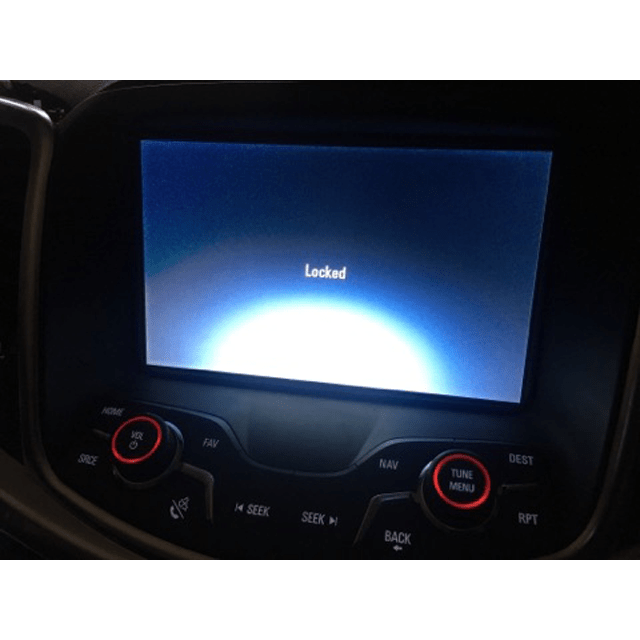
The MyLink head unit fitted to all Holden VF Commodores and HSV Gen-F vehicles is VIN-locked from the factory. If you replace or swap your MyLink with a second-hand unit, it won’t function properly until it’s re-linked to your vehicle’s VIN — you’ll see a security warning, no Holden splash screen, missing functionality and feature lockouts.
This kit lets you perform that security-linking yourself at home using OBDSync, our Windows laptop software. Plug the included scantool into your OBD-II port, run through the on-screen steps, and the MyLink is married to your VIN within minutes — no workshop visit, no waiting on couriers.
The same kit also gives you full control over a wide range of MyLink-specific settings — volumes, languages, logo branding, built-in apps and more.
Watch a full walkthrough of the OBDSync software and the VF MyLink security linking process:
Provide your VIN at checkout. We ship the OBDSync scantool together with a printed 3-token redemption serial.
Download & install OBDSync (Windows 10 / 11, 64-bit). Create or sign in to your OBDSync account, then enter your redemption serial to add the 3 tokens to your own account.
Plug the scantool into your VF’s OBD-II port, follow the prompts in OBDSync, and the MyLink is security-linked to your VIN in minutes.
Beyond the primary VIN security linking, the OBDSync software gives you fine-grained control over a wide range of MyLink settings — tweak any of these whenever you like:
Works on all Holden VF Commodore and HSV Gen-F vehicles with the factory MyLink head unit (2013–2017):
OBDSync runs on Windows 10 or Windows 11 (64-bit only). A laptop is recommended so you can sit in the car with the scantool plugged into the OBD-II port. A free USB-A port is required.
When you add this product to your cart you’ll be asked for your VIN so we can verify the kit is suitable for your vehicle. Your scantool and printed token redemption serial are dispatched once your order is processed — you then redeem that serial yourself inside OBDSync to apply the tokens to your account.
DIY kit only — no workshop visit, no shipping the radio anywhere. Program from your driveway in minutes.
| Weight | 0.2 kg |
|---|---|
| car-model | Clubsport, Grange, GTS, Maloo, Senator, Commodore, Ute, Calais, Caprice, Statesman |
| car-year | 2017, 2016, 2015, 2014, 2013 |