
Support Email: [email protected]

Holden VE Series 2 IQ Radio VIN Security Linking Programming

$250.00

SKU: VEIQSecurityLink
Product by:

Security link a replacement Holden VE Series 2 IQ Radio to your vehicle’s VIN at home with our OBDSync DIY kit — includes the OBDSync scantool plus 2 programming tokens.

🔌 DIY OBDSync Kit
🎥 Suits Series 1→2 Conversions
💻 Windows Required

Unlocks reverse camera, RSE, Video in Motion (VIM), custom logo, audio setup and more.

SHARE:

SKU VEIQSecurityLink Category Brand: ,

Description

Holden • VE IQ Radio • 2010–2013 + Series 1 Conversions

VIN Security Linking — DIY OBDSync Kit

Unlock a replacement VE Series 2 IQ head unit by security-linking it to your vehicle’s VIN. We ship you an OBDSync scantool plus 2 tokens so you can complete the linking — and unlock a stack of configurable options — from home.

Turnaround
Same / Next Day Dispatch
Service Type
DIY (OBDSync)
Compatibility
VE Series 2 IQ Radio

About This Service

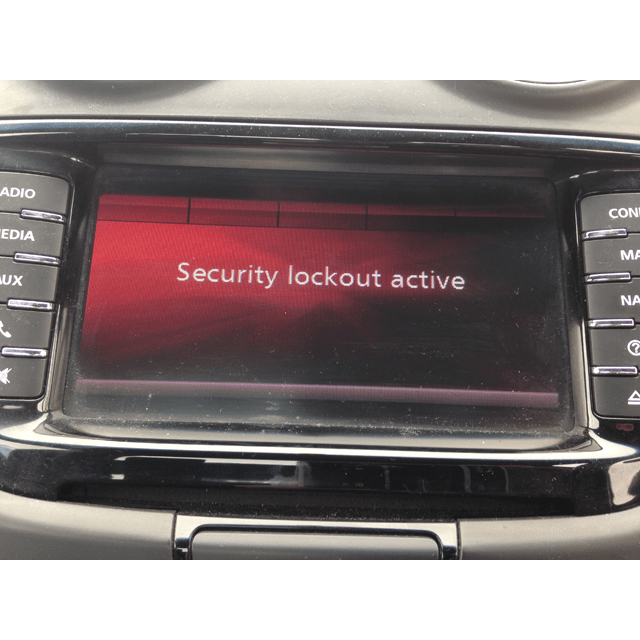
When you fit a second-hand VE Series 2 IQ head unit to a vehicle that wasn’t originally paired with it, the radio displays a security lockout and won’t operate. Our service unlocks the head unit by security-linking it to your vehicle’s VIN, restoring full functionality — and giving you access to a range of configurable options that aren’t accessible from the factory menus.

This is a DIY-only service. We ship you the OBDSync scantool plus the two tokens needed to license the radio. You run the programming yourself at home using a Windows laptop — the radio never has to leave your vehicle.

Compatible Vehicles

Suits all VE Series 2 Commodore, Statesman/Caprice and HSV variants fitted with the IQ infotainment head unit (built 2010–2013):

Omega, Berlina, Calais & Calais V
Commodore SV6, SS, SS-V & Redline
Sportwagon (Series 2 / Z Series)
Ute (Omega, SV6, SS, SS-V)
Statesman & Caprice (WM Series II)
HSV Clubsport, Maloo, Senator, GTS & Grange
🔁

Also Suits VE Series 1 → Series 2 Conversions

Upgrading your VE Series 1 vehicle to a Series 2 IQ head unit? This service security-links the radio for you. Note that a proper Series 1 → Series 2 IQ conversion also requires:

  • A wiring patch loom (radio connector adapter)
  • A modified HVAC unit (for the new climate control interface)

Both available separately — ask us for links if you’d like the matching parts.

How the OBDSync DIY Programming Works

DIY Kit
🔌
Program at Home with OBDSync
No shipping the radio — everything happens in your driveway.

We post you the OBDSync scantool along with 2 tokens needed to license your IQ radio. Plug it into your car’s OBD-II port, connect to a Windows laptop, and follow the on-screen prompts.

  • We dispatch the OBDSync scantool + tokens to your address
  • Plug into the OBD-II port, connect to your Windows laptop
  • Run the OBDSync software to security-link the radio
  • Same / next business day dispatch from order
Bonus: You keep the OBDSync scantool to use again for future programming and diagnostics.

What’s Included in Your Kit

🔌

OBDSync Scantool

The hardware that connects to your car’s OBD-II port and talks to your laptop. Yours to keep for future diagnostic and programming work.

🎟️

2 Tokens

The two universal OBDSync tokens needed to security-link your VE Series 2 IQ radio to your VIN through the software.

Configurable Options You Unlock

Once linked, the OBDSync software gives you access to a stack of options that aren’t available from the factory menus — turn them on or off as you like, any time:

📷Reverse Camera — enable factory or aftermarket reverse camera display through the head unit.
📺Rear Seat Entertainment (RSE) — enable rear-screen video output for second-row passengers.
🎬Video in Motion (VIM) — allow video playback while the vehicle is moving.
🎨Custom Boot-up Logo — change the splash logo shown when the radio starts up (Holden / HSV / custom).
🔊Audio Setup — fine-tune speaker configuration, amplifier and EQ settings.
And more — various other options available, see our videos for more.

See It in Action

Watch the OBDSync DIY VE IQ Radio security linking process from start to finish — straightforward and accessible to anyone comfortable with a laptop.

💻

Windows Laptop Required

You will need a laptop running 64-bit Windows 10 or 11 to run the OBDSync software. The software does not run on macOS, Linux, ChromeOS or mobile devices.

📝
Captured at checkout

When you add this product to your cart you’ll be asked to enter your vehicle’s 17-character VIN. We’ll contact you after your order if there are any other questions.

Turnaround Time

Same or Next Business Day Dispatch
Your OBDSync scantool and 2 tokens are dispatched the same / next business day from order.

What Happens Next

💻 Before you start: Have your Windows 10 / 11 (64-bit) laptop ready and your replacement IQ radio installed in the vehicle.
  • 1.We post you the OBDSync scantool + 2 tokens
  • 2.Connect the OBDSync scantool to your Windows laptop and your car’s OBD-II port
  • 3.Run the OBDSync software and follow the YouTube tutorial video to security-link your radio
  • 4.Enable any of the optional configurable features (reverse camera, RSE, VIM, custom logo, audio setup…)

This listing is for the DIY programming kit only — no head unit is supplied.

Additional information

Weight 0.2 kg
car-model

Clubsport, Grange, GTS, Maloo, Senator, Commodore, Ute, Calais, Caprice, Statesman

car-year

2013, 2012, 2011, 2010, 2009, 2008, 2007, 2006

Brand Information

  • Holden, HSV

Filter Data Information

  • Holden, HSV
  • Commodore, GTS/Maloo/Clubsport/Grange
  • 2006, 2007, 2008, 2009, 2010, 2011, 2012
  • V6 3.6L LE0, V6 3.6L LY7, V8 6.0L (LS2), V8 6.0L L76, V8 6.0L L98, V6 3.0L LF1, V6 3.6L LLT, V8 6.0L L77, V6 3.6L LFX, V8 6.0L LS2, V8 6.2L LS3
x