 English


$300.00


DIY VF Head Up Display (HUD) Custom Programming Kit — change or delete the factory startup logo, push calibration updates, and security link a replacement HUD module from your driveway.
Programming runs through OBDSync on a Windows laptop with the supplied scantool and 3-token redemption serial. No removal, no shipping — the HUD stays in the car.
For VF Commodore & HSV Gen-F models factory-fitted with a Head Up Display, or for retrofit HUD installations.
Change or delete the factory startup logo on your VF Head Up Display, push calibration updates, or security link a replacement / retrofit HUD module — all programmed in your driveway from a Windows laptop. DIY kit ships with an OBDSync scantool and a 3-token redemption serial.
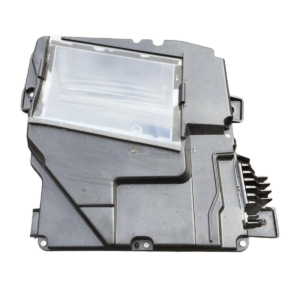
The VF Head Up Display projects vehicle info (speed, gear, nav directions, warnings) onto the windscreen via a small projector at the base of the dash. From the factory, it boots up with a fixed logo or splash screen that you can’t change from the in-car settings menu — that part is locked away in the HUD module’s firmware.
This kit lets you reach in and customise that startup logo, run any factory calibration updates the HUD module is missing, or security link a replacement / retrofit HUD to your vehicle so it actually works. All done over OBD-II with the HUD bolted in the car — no removal, no shipping.
Provide your VIN at checkout. We ship the OBDSync scantool together with a printed 3-token redemption serial.
Download & install OBDSync (Windows 10 / 11, 64-bit). Create or sign in to your OBDSync account, then enter your redemption serial to add the 3 tokens to your own account.
Plug the scantool into your VF’s OBD-II port, select the HUD options you want in OBDSync, and the changes are flashed to the module in minutes.
Watch the full OBDSync DIY walkthrough for the VF Head Up Display (HUD) — changing the startup logo, security linking a replacement HUD module, and pushing factory calibration updates, step by step.
Works on all Holden VF Commodore and HSV Gen-F vehicles (2013–2017) factory-fitted with a Head Up Display, plus retrofit installations:
OBDSync runs on Windows 10 or 11 (64-bit only). A laptop is recommended so you can sit in the car with the scantool plugged into the OBD-II port. A free USB-A port is required.
When you add this product to your cart you’ll be asked for your VIN so we can confirm the kit is suitable for your vehicle. Your scantool and printed 3-token redemption serial are dispatched once your order is processed — you then redeem that serial yourself inside OBDSync to apply the tokens to your account.
DIY kit only — customise your VF HUD or pair in a replacement, all from your driveway in minutes.
| Weight | 0.2 kg |
|---|---|
| Dimensions | 15 × 10 × 5 cm |